A healthcare organization needed staff reachable away from their desks without work following them home. I built the learning strategy and framework first, then a 6-lesson course in which every skill is paired with a boundary.
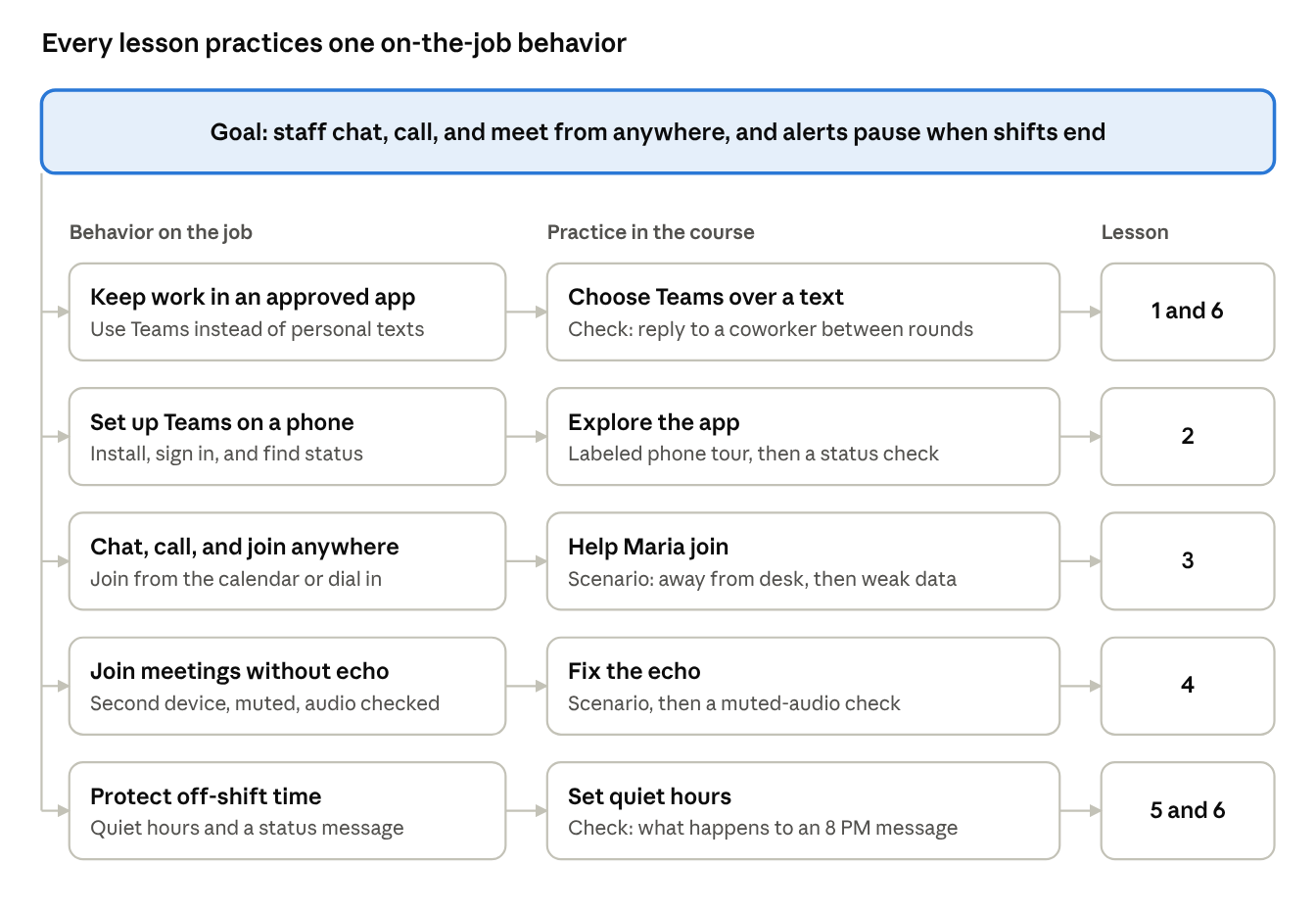
The action map: every lesson practices one on-the-job behavior.
Staff spend much of the day away from a desk. They needed to stay reachable without moving work into personal texts or carrying alerts into their off-shift time.
Staff reachable away from a desk, work conversations kept in an approved app, and alerts that respect shift boundaries.
Connected, not tethered. Every capability taught (chat, calls, meetings) is paired with a boundary (quiet hours, status messages, approved apps).
Three models, each with one job: Action Mapping sets what the course contains, SAM sets how it gets built and reviewed, and Bloom's taxonomy sets how hard each lesson asks learners to think.
Started from the business goal, named five on-the-job behaviors, designed a practice activity for each, then added only the information that practice needs.
Why: Content that doesn't support a behavior stays out, so the course stays short.Short design, prototype, and review cycles instead of one long build. The outline, the clickable prototype, and each client review round are SAM iterations.
Why: The client reacts to something real early, when changes are cheap.Lessons move from understand (1–2) to apply (3–5) to evaluate (6 and the scenarios). Each objective uses a matching verb.
Why: Learners build confidence before they're asked to judge situations.Every lesson follows the same arc: activate, demonstrate, apply with feedback, then act on the job.
Practice: reply to a coworker between rounds. On the job: move one work text into Teams.
Practice: labeled phone tour, then a status check. On the job: install and sign in.
Practice: help Maria join a meeting away from her desk, then on weak data. On the job: join one meeting from your phone.
Practice: fix the echo from a second device. On the job: test audio with earbuds.
Practice: what happens to an 8 PM message? On the job: set quiet hours and a status message.
Practice: the 9 PM question. On the job: update the app.
A 10-question final assessment (80% to pass) and a "This week, I will…" action plan.
Each theory maps to a feature a reviewer can point to in the course.
The prototype targets WCAG 2.2 AA and follows Universal Design for Learning (UDL): the same idea comes as text, a drawing, and a list, and learners choose their own path through the menu.
Measured with Kirkpatrick's four levels. Levels 1 and 2 are built into the course; Levels 3 and 4 are agreed with the client before launch.
Recommended next: spaced reinforcement nudges at 2 and 7 days, a one-page job aid, managers modeling quiet hours, and a pilot with 5 to 8 staff before launch.
I set the strategy, built the framework, and designed and reviewed every lesson. I used AI (Claude and Claude Code) as a build partner to turn the storyboard into a clickable prototype for client review.
I'd love to hear what you're rolling out and the behavior you need to change.
Let's talk